
Lambda Web Functions - From Local to Cloud

Over the years, one of the recurring challenges I’ve encountered with engineers around Lambda development is the local developer experience. Getting an application running locally, whilst accounting for Lambda events and the services around it, can take a bit of extra work. Somewhat creating unnecessary friction that engineers shouldn’t necessarily need to cater for.
That’s why the announcement of Lambda Web Functions caught my attention. The idea is simple: take a familiar Node.js server running a web framework, and run it on a Lambda. For a small API, that could make the journey of taking a local application to a deployed application a lot more approachable.
So let’s take a look at how Web Functions work, build a few architectural examples and explore where they could fit into your systems.
What is a Web Function?
With a traditional Lambda, the handler receives an event and returns a result. The model has always been event-driven, and async processing. Different AWS services can sit in front of the Lambda to surface these events to trigger invocations - some being API Gateway and SQS.
A Web Function runs an application that listens on a port instead. Within our Node.js land, that means we can use frameworks like Express or Hono to run the service whilst Lambda provides the HTTPS endpoint and scales the application with inbound traffic. There is no special Lambda-specific HTTP adapter to add. This is pretty huge.
AWS has made this distinction through a change in naming now with the Lambdas, traditional model is now “Event Functions”. They have specified that it is a naming change only, and existing functions continue to work as expected - I’ll link the launch announcement blog at the bottom of this post that covers the wider release.
A Long-standing DX Challenge
As I alluded to in the intro, one of the sticking points I’ve heard raised over the years with serverless architecture is the local DX. With a “normal” web server, you spin it up, send a request and see the result.
With Lambda, there is the additional overhead of accounting for the event shape, runtime and any additional AWS services that are responsible for sending the event. The feedback development loop can become cumbersome, especially whenever testing a change requires a deployment to see how it behaves.
We’ve had a number of tools built to try and close this gap, making it easier to develop these serverless-first applications. Tooling like LocalStack and SST are examples of the options that you can reach for but both come with their caveats and nuances.
The main point that immediately jumps out to me with these sorts of tools is that there is a desire for a smoother local workflow.
With the introduction of Lambda Web Functions, that really begins to close that gap - you’re running the same web server locally and on Lambda. There is still the plethora of other services that might interface with your Lambda both inbound and outbound that you’ll need to consider, but running the app feels much closer to what we run locally.
Jumping in: simple
Reusing one of my common examples of recipes, let’s put together an ordinary Express service with some straightforward endpoints:
import express from 'express';

const app = express();
const port = Number(process.env.PORT ?? 3000);

app.get('/health', (_req, res) => {
  res.json({ status: 'ok' });
});

app.get('/recipes', (_req, res) => {
  res.json([{ id: '1', name: 'Carbonara' }]);
});

app.listen(port, '0.0.0.0', () => {
  console.log(`Listening on port ${port}`);
});
Hitting this both locally, and deployed on AWS provides the same response which is amazing:
Local:
curl -X GET http://localhost:3000/recipes

[{"id":"1","name":"Carbonara"}]%
Deployed in Lambda Web Function manually through the console for testing purposes, I just zipped and uploaded the code with the node_modules containing the Express binaries:
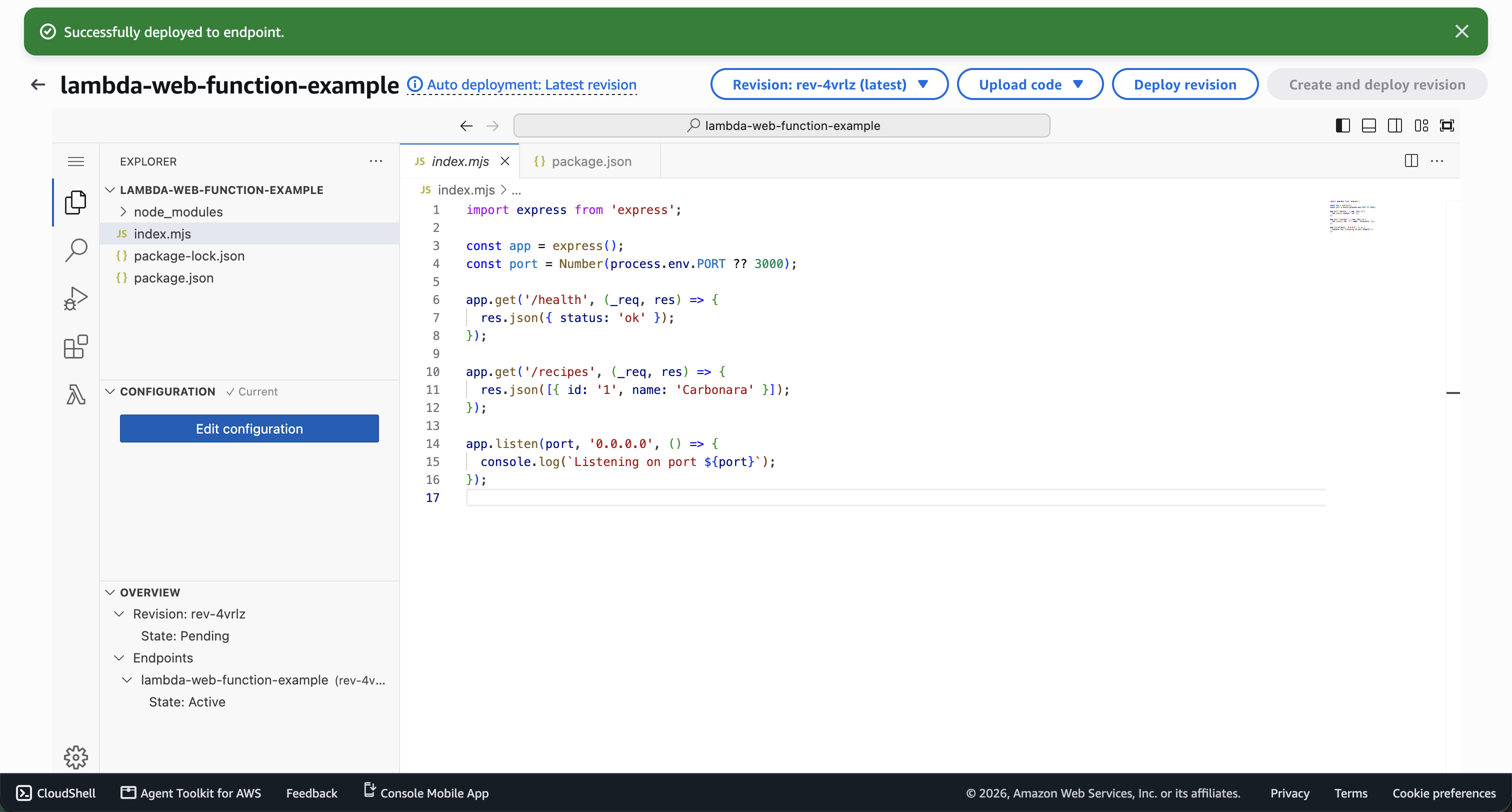
And when I made a request to the newly provisioned endpoint:
curl -v -X GET https://<endpoint-id>.cjm.lambda-web.eu-west-2.on.aws/recipes

* Host <endpoint-id>.cjm.lambda-web.eu-west-2.on.aws:443 was resolved.
* IPv6: (none)
* IPv4: 13.134.x.x
*   Trying 13.134.x.x:443...
* Connected to <endpoint-id>.cjm.lambda-web.eu-west-2.on.aws (13.134.x.x) port 443
* ALPN: curl offers h2,http/1.1
* (304) (OUT), TLS handshake, Client hello (1):
*  CAfile: /etc/ssl/cert.pem
*  CApath: none
* (304) (IN), TLS handshake, Server hello (2):
* (304) (IN), TLS handshake, Unknown (8):
* (304) (IN), TLS handshake, Certificate (11):
* (304) (IN), TLS handshake, CERT verify (15):
* (304) (IN), TLS handshake, Finished (20):
* (304) (OUT), TLS handshake, Finished (20):
* SSL connection using TLSv1.3 / AEAD-AES128-GCM-SHA256 / [blank] / UNDEF
* ALPN: server accepted http/1.1
* Server certificate:
*  subject: CN=r2d.lambda-web.eu-west-2.on.aws
*  start date: Jul  6 00:00:00 2026 GMT
*  expire date: Jan 19 23:59:59 2027 GMT
*  subjectAltName: host "<endpoint-id>.cjm.lambda-web.eu-west-2.on.aws" matched cert's "*.cjm.lambda-web.eu-west-2.on.aws"
*  issuer: C=US; O=Amazon; CN=Amazon RSA 2048 M01
*  SSL certificate verify ok.
* using HTTP/1.x
> GET /recipes HTTP/1.1
> Host: <endpoint-id>.cjm.lambda-web.eu-west-2.on.aws
> User-Agent: curl/8.7.1
> Accept: */*
>
* Request completely sent off
< HTTP/1.1 200 OK
< Date: Thu, 29 Oct 2026 20:41:55 GMT
< Content-Type: application/json; charset=utf-8
< Content-Length: 31
< X-Powered-By: Express
< ETag: W/"1f-ngFlVUU2kPxI6EDiwITOZ6SM+ic"
< lambda-web-logstream: 2026/10/29/<endpoint>[rev-4vrlz]12345
< lambda-web-request-id: <request-id>
<
* Connection #0 to host <endpoint-id>.cjm.lambda-web.eu-west-2.on.aws left intact

[{"id":"1","name":"Carbonara"}]%
That’s pretty powerful.
Jumping in: something more complex
Returning JSON showcases the basics of what we could achieve - building some form of RESTful API. But let’s extend the application with a report progress feed.
Instead of waiting for the report to finish, the client receives updates as each stage completes. We can do that using server-sent events (SSE) - one-way HTTP communication in which the request stays open whilst the server sends updates - extending our example above:
app.get('/reports/progress', (req, res) => {
  res.set({
    'Content-Type': 'text/event-stream',
    'Cache-Control': 'no-cache',
  });
  res.flushHeaders();

  const stages = ['Checking inputs', 'Preparing report', 'Complete'];
  let index = 0;
  const timer = setInterval(() => {
    res.write(`data: ${JSON.stringify({ stage: stages[index++] })}\n\n`);
    if (index === stages.length) {
      clearInterval(timer);
      res.end();
    }
  }, 1000);

  req.on('close', () => clearInterval(timer));
});
If we deploy this to our Lambda function, and then cURL it once more:
curl -X GET https://<endpoint-id>.cjm.lambda-web.eu-west-2.on.aws/reports/progress

data: {"stage":"Checking inputs"}

data: {"stage":"Preparing report"}

data: {"stage":"Complete"}
The stages are simulated, but you can imagine that the same response SSE pattern could provide progress updates from Step Functions, or stream output from LLMs via Bedrock.
So where does this leave API Gateway?
Web Function and API Gateway can work hand-in-hand together - it gives us another option for proxying requests to compute under the hood.
| Approach | Request path |
|---|---|
| Existing serverless API | API Gateway → Lambda Event Function |
| Direct endpoint | Client → Web Function HTTPS endpoint |
| Gateway in front | API Gateway → HTTP proxy integration → Web Function endpoint |
With the third approach here, Gateway can handle the client auth side of things and proxy it to the Web Function via the HTTP integration.
However, there is one significant architectural detail that I need to highlight: the Web Function endpoint that gets provisioned, remains exposed to the public internet.
Therefore, we cannot fully delegate the authentication & authorization side of things to the API Gateway. It means validation auth in the application, or checking a securely managed origin credential - AWS explains the options in their docs.
For me, the decision ultimately comes back to what the API already needs. If we’re using custom authorizers, usage plans or transformations, these still have value.
But what about cold starts?
They will still occur. Web Functions scale to zero, and a request may wait for a new environment to initialise.
The main difference is that an environment can handle multiple concurrent requests. A warm environment can absorb more traffic before another one needs to start. AWS has described fewer cold starts, rather than their complete removal, so it’s something to keep in mind and we will see how it progresses as adoption grows.
The cost of waiting
Web Functions bill for requests, active CPU time, memory and data transfer. Waiting for something like a Bedrock response or a database query might use little CPU, but the memory is the larger factor here.
Saying that, it could suit our streaming example quite well. Whether it’s cheaper overall depends on the workload, environment lifetime and any gateway charges. I’d want a carefully measured experiment as a comparison before and after, before ruling it a saving.
Conclusion
For quickly spinning up a test, or development environment I can definitely see the appeal. We’re taking a HTTP server that feels familiar locally and running it on AWS in the same fashion. For a small project or prototype, that’s a great starting point.
Where I’d be interested to push it further is a larger production application. How does it handle sustained traffic or sudden bursts? Do long-running requests fit into the model? At what point do cost or ops requirements make something like ECS or EC2 a better choice?
I wouldn’t assume we have to move just because the project grows. Those are things I’d want to measure.
There’s enough here to try something small, and see where it takes you. A few questions I’d leave you with to think about:
- Could this serve a live deployment dashboard, report feed or agentic assistant?
- Could two-way communication be supported in the future? Web Functions currently don’t support WebSocket but can facilitate SSE.
- What changes when several requests share an environment, particularly around state and downstream connections?
Read more about the Lambda Web Functions in the announcement blog